Which Linux command or utility is simple, powerful, and surprisingly unknown to many people or used less often?
This could be a command or a piece of software or an application.
For example I’m surprised to find that many people are unaware of Caddy, a very simple web server that can make setting up a reverse proxy incredibly easy.
Another example is fzf. Many people overlook this, a fast command-line fuzzy finder. It’s versatile for searching files, directories, or even shell history with minimal effort.
A few that I use every day:
- Fish shell
- Starship.rs
- Broot (a brilliant filesystem navigator)
- Helix editor (My favorite editor / IDE, truly the successor to vim IMO)
- Topgrade (updates everything)
Just commenting to give more love to helix. It’s my favorite “small quick edits” editor.
I heard about helix from you and I’ve used it for a year and a half or so now, it’s by far the best editor I’ve used so far and I can definitely vouch for it
Nice!
I’ve actually been testing with fish recently coming from zsh, though I might wait until 4.0 fully releases before I make a more conclusive decision to move or not.
With that said, I remember looking through omf themes and stumbled onto Starship that branched off one of the themes and really liked the concept.
One thing that holds people back sometimes is that bash scripts that set environment variables don’t work by default. https://github.com/edc/bass is an easy solution
Could you explain them in more depth? I opened them and don’t know
Helix is a terminal based text editor. It’s much like vim / neovim, but unlike those editors it’s good to go right out of the box, no configuration or plugins needed to make it work well.
Topgrade is one I haven’t used, but it looks like its intended purpose is to let you upgrade your apps with one command, even if you use multiple different package managers (I.e. if you were on Ubuntu, you could use it to upgrade your apt packages, at the same time as your snap packages, as well as flatpak, nix, and homebrew if you’ve added those.)
Thank you for explaining. I would never have understood topgrade without your example :)
Fish is a replacement of bash that’s a bit more user friendly (has some cool auto completion features out of the box and more sane behaviour like handling of spaces when expanding variables). I personally started to use nutshell recently but unlike fish it’s very different from bash.
Starship is a “prompt” for various shells (that bit of text in terminal before you enter the command that shows current user and directory in bash). I haven’t used it but AFAIK it has many features like showing current time, integration with git, etc.
Yep, here’s my Starship prompt, for example:
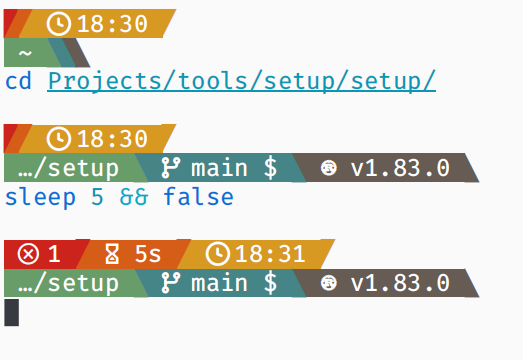
So, I have it configured to show:
- the exit code of the last command (if it’s non-zero),
- the duration of the last command (if it’s longer than 2 seconds),
- the time (when the last command ended),
- the current directory,
- the current Git branch, and it also shows some Git status information, for example the
means I have something stashed, - and finally the technology in use in a repository/directory, so in this case that repo uses Rust and the compiler version is 1.83.
I think a lot of people don’t realise that yt-dlp works for many sites, not just YouTube
I used it recently for watching a video from tiktok without having to use their god awful web UI and it was amazing
Also works on Twitch with the added benefit of NOT playing ads (you still get breaks, just with a placeholder screen instead of the commercial).
mpv has yt-dlp support built in, so it can just play the streams directly.
Wait how?
mpv --ytdl URL. Read starting from --ytdl option in the mpv man page, you can even give specific yt-dlp options through --ytdl-raw-options.
Since everyone keeps mentioning yt-dlp I gotta ask: what’s wrong with the original youtube-dl? I keep using it, it works, it’s still being updated.
yt-dlp has sponsorblock features, youtube-dl does not.
deleted by creator
I use it occasionally but every time I need to do something a tiny bit more complex than “extract field from an object” I have to spend half an hour studying its manual, at which point it’s faster to just write a Python script doing exactly what I need it to do.
https://github.com/johnkerl/miller is like awk, sed, cut, join, and sort for name-indexed data such as CSV, TSV, and tabular JSON
yq can do both JSON and YAML :)
Funny how this was one of the first tools I learnt once I “seriously” started my linux journey, lol
nano was and still is vital to me learning and using linux, I will not learn how to use vim so if the distro forces it to be default im not using it.
Why is editing text so convoluted for seemingly no reason… also hate that vim must be used for certain files.
You can change your hate to love by using vim
one of my favorite linux youtubers is named vimjoyer so maybe one day I will try to learn it
You can change that by changing your editor global variable
It’s for people to memorize hundreds of arcane shortcuts and shit so they can feel like a smug hacker and gloat over the rest of us using other editors and getting just as much done as they are.
Also for graybeards that haven’t realized it’s not 1985 anymore.
For the average user you’re definitely right, but I will say for the sysadmin of headless systems, having a powerful cli editor is a godsend. While it may seem arcane and unnecessary, learning vim is easier than managing remote x or sshfs or copying files to and from a system.
I didn’t learn vim to be a contrarian; I learned it because it seemed (and still seems to be) the path of least resistance for many workflows.
Wait until you meet an emacs user! ;p
It’s for people that don’t want a big bulky IDE and are willing to put a little work in to get used to it. I do all my coding in the terminal with vim and tmux and I like the simplicity and that with two dotfiles I can migrate my whole development environment to whatever PC, server or RaspberryPi that I need.
I’ve used Vim for some pretty non-nerdy stuff. Like ripping my DVD collection, when I got to the TV section I had a lot of file names to modify in bulk, and Vim let me do that. Also guitar tablature, the ability to edit plaintext both horizontally and vertically is surprisingly handy. Just having a macro to be able to add a bar line saves a shocking amount of time.
It was mostly a joke. I was just trying to mess with people 😉
Which I’ll use as a lighthearted excuse to mention things like the block edit mode.
Wow you triggered a lot of vim users !
Maybe give micro a shot :) It’s nano but more sane defaults and comes with customization in mind.
vim must be used for certain files??
Cant remember exactly but it had something to do with a file relating to sudo and it only was allowed to be edited with a vim style editor.
There’s a separate command called
visudofor this purpose.You CAN use any ol’ text editor but visudo has built-in validation specific to the sudoers file. This is helpful because sudoers syntax is unique and arcane, and errors are potentially quite harmful.
But visudo can use any editor if you set SUDO_EDITOR or EDITOR variables. If you don’t want to use vi(m) you should probably set EDITOR in your .bashrc and visudo and probably other programs will use your editor of choice.
visudo?There may be certain times where it’s all that’s available, I think I remember having to edit fstab in some recovery state in vi
Yeah, to this day vim still isn’t intuitive for me, so I just use nano as it’s either often included or simple to install on most Distros.
Unless a script is hardcoded for vim I haven’t had to use it.
It’s weird but VIM is so powerful and I love it but i also agree it wouldn’t be the default just an option if you needed it. It’s like with notepad ++ on windows it’s wonderful but not everyone needs it from day one notepad will work just fine for basic typing.
I used nano when I started but now I am using vim for one year already. I’d recommend taking a few days where you only use vim and I think you will see why people like it. With a few motions you can be much faster than you would be in Nano.
I’m using Linux since 1998 and still like nano. I can use vi, but prefer nano when it’s available.
One of the big reasons I switched to nixos is that I mostly need to use the console only for updating my system by editing the configuration file using nano. I do very little besides that thankfully while the GUI side of linux gets better everyday.
I use fuck to fix typos
That’s fantastic, I can’t wait to go home and install it
grep goes crazy if you know your regex
I was expecting this one.
I can never get grep to work consistently on Mac and Linux. Now, ripgrep OTOH…
I’m a big fan of
screenbecause it will let me run long-running processes without having to stay connected via SSH, and will log all the output.I do a lot of work on customers’ servers and having a full record of everything that happened is incredibly valuable for CYA purposes.
I’d recommend
tmuxfor that particular use. Screen has a lot of extras that are interesting but don’t really follow the GNU mentality of “do one thing and do it well.”Tmux / Screen is like the emacs/vim of the modern day Linux I think.
Screen is more than capable, but for those who have moved to Tmux, they will absolutely advocate for it.
When tmux was first released I was already so used to screen that I never really considered switching. What would some convincing arguments be for me to make the effort to switch now?
Tmux was purpose built for terminal multiplexing. You can assign session names for organizing and manipulating multiple instances. Send keys to and read output from detached sessions. It’s easy to script.
The thing that got me to switch was being able to maintain my pane layout between connections. The various window and pane management niceties (naming, swapping, listing and the like) got me to stay. Now you can keep your screen, but you’d have to pry tmux from my cold, dead, tty.
There is also zellij, which can do the same but also has modern functionality specific for development workspaces!
(Although
screenortmuxwill still probably be more widely available on remote machines etc)nohupis similarI’ve had nohup fail to keep things running after my session ended quite frequently. It’s like it just goes to the next step in the process then gives up.
It’s likely that you’re using a systemd based system and the admin hasn’t enabled
lingerfor your user.The servers are very locked down, so I’m sure that’s part of our compliance requirements. I haven’t looked into fixing it because I just wrote a script to hit Enter every 10 minutes to keep it alive.
Ha! Faking key presses, truly an elegant weapon for a more civilized age. If it works, it works.
It’s not as useful, sadly. Nohup disconnects standard input, output, and error. With screen or tmux, you can reattach them later.
Woah screen is seeing active development again? There was like a decade where it stagnated. So much so that different distros were packaging different custom feature patches (IIRC only Ubuntu had a vertical split patch by default?) Looking at it now, the new screen maintainers had to skip a version to not conflict with forks that had become popular.
When tmux stabilized I jumped ship immediately and never looked back.
tmux with control mode in iterm is god mode for me on all my machines. Absolutely love it.
I know everyone likes tmux but screen is phenomenal. I have a .screenrc I deploy everywhere with a statusbar at the bottom, a set number of pre-defined tabs, and logging to a directory (which is cleaned up after 30 days) so I can go back and figure out what I did. Great tool.
I find myself using tldr a lot since finding out about it. It’s just so useful for commands that I don’t use enough to commit to memory.
I know
tmuxis incredibly popular, but a good use case for it that isn’t common is teaching people how to do things in the terminal. You can both be attached to the same tmux session, and both type into the same shell.ddis probably well known, but one of the simplest and most powerful ways to accidentally delete all data on your hard drive.dd if=/dev/random of=/dev/sdaddrescue (or gddrescue) is a great version if you have a sick drive. It’ll try to copy the good areas first then go back to hammer on the sick areas.
Not perfect as it doesn’t know about the file system so it tries to copy the entire surface, but generally a good tool.
The pipe (
|), which if you think about it is the basis for function composition.pipeviewer or
pvGreat call!
pvis deceptively powerful. Being able to see progress and rate limit a pipe is incredibly useful.
I like https://github.com/aristocratos/btop personally. It’s way prettier than the normal top command which you use to watch processes to find the one that’s hogging all of the CPU or whatever. And it’s not so much that it’s underrated so much as it’s not very well known or distributed by default.
Using rust rewrite of coreutils you can
cp -gto see progress. Set an alias :)I’m not sure how underrated it is but the exec feature in
findis so useful, there are so many bulk tasks that would just be incredibly difficult otherwise but instead are just one lineJust be careful with files with spaces in the name. There’s an incantation with
xargsthat I always have to look up when I want to use it safely.